1.描述
1.描述
先使用插件模板生成工具创建一个插件工程。假如插件名为“MyDateCellType”,插件类型为单元格类型。下面以这个插件举例,来说明如何增加属性。
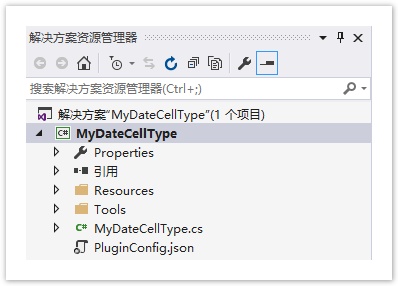
查看完整代码请参见https://gitee.com/huozige-china/my-date-cell-type。
2.在插件中增加属性
操作步骤
 打开“MyDateCellType.cs”文件,添加DateMode属性的C#代码。
namespace MyDateCellType
{
    [Designer("MyDateCellType.MyDateCellTypeDesigner, MyDateCellType")]
    [Icon("pack://application:,,,/MyDateCellType;component/Resources/Icon.png")]
    public class MyDateCellType : CellType
    {
        public DateMode DateMode
        {
            get; set;
        }
    }
    public enum DateMode
    {
        Date,
        Time,
        DateTime
    }
}
 在“MyDate.js”文件中,基于设计器的元数据,使用laydata .js生成日期类型。
var MyDateCellType = (function (_super) {
    __extends(MyDateCellType, _super);
    function MyDateCellType() {
        return _super !== null && _super.apply(this, arguments) || this;
    }

    MyDateCellType.prototype.createContent = function () {
        var container = $("<div id='" + this.id + "'></div>");
        var innerContainer = $("<input type='text' id='myDateCellType_" + this.id + "'/>");
        innerContainer.css("outline", "none");
        container.append(innerContainer);
        return container;
    }

    MyDateCellType.prototype.onLoad = function () {
        var type = this.getLayDateType();
        laydate.render({
            elem: '#myDateCellType_' + this.id,
            type: type
        });
    }

    MyDateCellType.prototype.getLayDateType = function () {
        var element = this.cellElement;
        var cellTypeMetaData = element.CellType;
        var type = "date";
        if (cellTypeMetaData.DateMode == DateMode.Time) {
            type = "time";
        } else if (cellTypeMetaData.DateMode === DateMode.DateTime) {
            type = "datetime";
        }
        return type;
    }

    return MyDateCellType;
}(Forguncy.CellTypeBase));

var DateMode = {
    Date: 0,
    Time: 1,
    DateTime: 2
}

// Key format is "Namespace.ClassName, AssemblyName"
Forguncy.CellTypeHelper.registerCellType("MyDateCellType.MyDateCellType, MyDateCellType", MyDateCellType);
 下载laydate.js文件压缩包,并将其中的theme文件夹及js文件复制到Resources文件夹下。下载地址为http://www.layui.com/laydate/。
 打开Resource文件夹,将laydate.js文件属性中的“复制到输出目录”规则修改为“如果较新则复制”。
 编辑PluginConfig.json文件,将laydate.js和theme\\default\\laydate.css文件添加到其中。
{
  "assembly": [
    "MyDateCellType.dll"
  ],
  "javascript": [
    "Resources/MyDateCellType.js",
    "Resources\\laydate.js"
  ],
  "css": [ "Resources\\theme\\default\\laydate.css" ],
  "image": "Resources/PluginLogo.png",
  "description": "please edit description here",
  "name": "MyDateCellType",
  "pluginType": "cellType",
  "guid": "b6cb944a-0472-410a-9a4e-3aa28c4d7960",
  "version": "1.0.0.0",
  "dependenceVersion": "6.0.102.0"
}

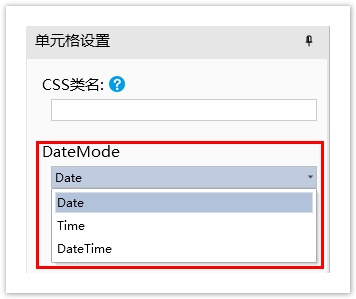
运行工程,并重启设计器,在设计器中选择单元格,设置其单元格类型为“MyDateCellType”,即可看到自定义属性“DateMode”。