
 1.描述
1.描述
如果您定义了一个有三个按钮的按钮组单元格类型,您需要为每个按钮设置命令。
2.为属性添加命令设置
为按钮设置命令如下所示:
public class ButtonGroupCellType : CellType
{
    public List<Command> AddButtonCommandList
    {
        get; set;
    }
    public List<Command> EditButtonCommandList
    {
        get; set;
    }
    public List<Command> DeleteButtonCommandList
    {
        get; set;
    }
}
在这个例子中,如果您为按钮设置一个“设置单元格属性”的命令,选择A1单元格,设置其值。右击这个单元格查找所有的引用时,您会发现查找不到任何引用,这是为什么呢?
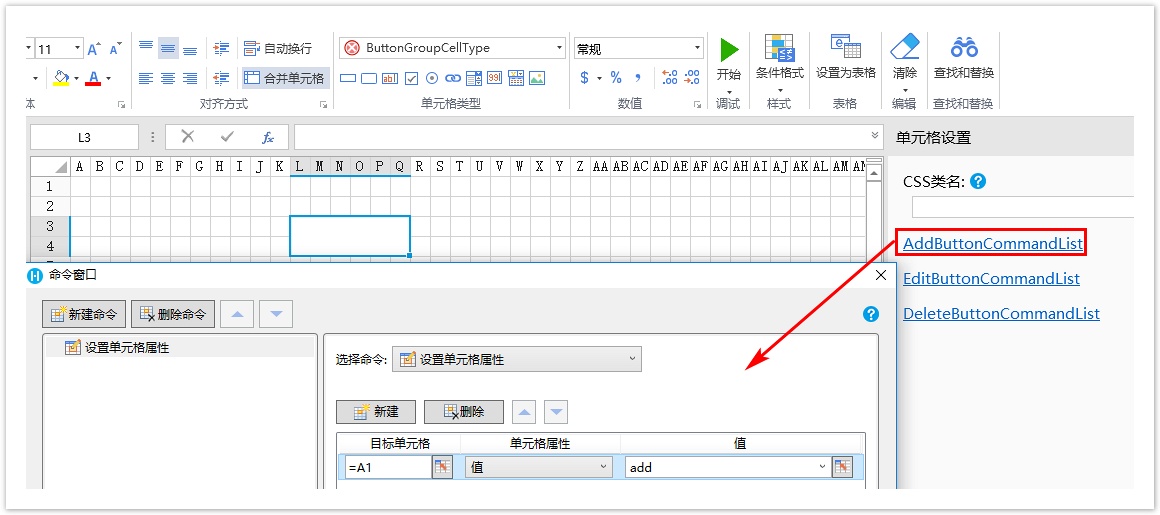
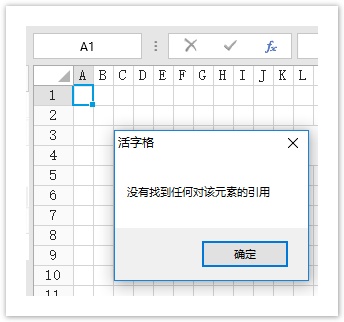
在上面的例子中,应实现IReferenceCommand接口,返回属性中使用的所有命令,这样当您查找命令中的引用时,就会将其查找出来。
[Designer(typeof(ButtonGroupCellTypeDesigner))]
public class ButtonGroupCellType : CellType, IReferenceCommand
{
    public List<Command> AddButtonCommandList
    {
        get; set;
    }
    public List<Command> EditButtonCommandList
    {
        get; set;
    }
    public List<Command> DeleteButtonCommandList
    {
        get; set;
    }
    public IEnumerable<LocatedObject<List<Command>>> GetCommandList(LocationIndicator location)
    {
        if (AddButtonCommandList != null)
        {
            yield return new LocatedObject<List<Command>>(AddButtonCommandList, location.AppendProperty("AddButtonCommandList"));
        }
        if (EditButtonCommandList != null)
        {
            yield return new LocatedObject<List<Command>>(EditButtonCommandList, location.AppendProperty("EditButtonCommandList"));
        }
        if (DeleteButtonCommandList != null)
        {
            yield return new LocatedObject<List<Command>>(DeleteButtonCommandList, location.AppendProperty("DeleteButtonCommandList"));
        }
    }
}
手动打开命令对话框
当您定义了属性List<Command>,您不需要指定其编辑器,会自动生成命令对话框。还有一种方法手动打开命令对话框。
[Designer("ButtonGroupCellType.ButtonGroupCellTypeDesigner,ButtonGroupCellType")]
public class ButtonGroupCellType : CellType, IReferenceCommand
{

    // CellType code...
}

public class ButtonGroupCellTypeDesigner : CellTypeDesigner<ButtonGroupCellType>
{
    public override EditorSetting GetEditorSetting(PropertyDescriptor property, IBuilderContext builderContext)
    {
        if (property.Name == "AddButtonCommandList")
        {
            return new HyperlinkEditorSetting(new ShowCommandDialogCommand(builderContext));
        }
        return base.GetEditorSetting(property, builderContext);
    }
}
定义ShowCommandDialogCommand如下,在一些复杂的属性设置对话框中,命令设置窗口常使用此方法。
internal class ShowCommandDialogCommand : ICommand
{
    private IBuilderContext builderContext;
    public ShowCommandDialogCommand(IBuilderContext builderContext)
    {
        this.builderContext = builderContext;
    }
    public event EventHandler CanExecuteChanged;
    public bool CanExecute(object parameter)
    {
        return true;
    }
    public void Execute(object parameter)
    {
        var commandList = (parameter as IEditorSettingsDataContext).Value as List<Command>;
        var window = builderContext.GetCommandWindow(CommandScope.Cell);
        window.InitCommandEvent += () =>
        {
            return commandList;
        };
        window.UpdateCommandEvent += (object sender, List<Command> newCommandList) =>
        {
            (parameter as IEditorSettingsDataContext).Value = newCommandList;
        };

        window.ShowDialog();
    }
}
