1.描述
1.描述
为了确保单元格插件的属性值是有效的,插件应该实现ICellTypeChecker接口。
2.添加单元格类型插件检查器
下面的示例中使用了ICellTypeChecker:
[Designer("MyListCellType.MyListCellTypeDesigner,MyListCellType")]
public class MyListCellType : CellType
{
    public string TableName
    {
        get; set;
    }
    public string TextColumn
    {
        get; set;
    }
}


public class MyListCellTypeDesigner : CellTypeDesigner<MyListCellType>, ICellTypeChecker
{
    /// <summary>
    /// 当单击开始按钮以运行页面时,将调用该方法。
    /// </summary>
    /// <param name="context"></param>
    /// <returns></returns>
    public IEnumerable<ForguncyErrorInfo> CheckCellTypeErrors(IBuilderContext context)
    {
        if (string.IsNullOrEmpty(this.CellType.TableName))
        {
            yield return new ForguncyErrorInfo() { ErrorType = ForguncyErrorType.Error, Message = "TableName can't be empty." };
        }
        if (string.IsNullOrEmpty(this.CellType.TextColumn))
        {
            yield return new ForguncyErrorInfo() { ErrorType = ForguncyErrorType.Error, Message = "TextColumn can't be empty." };
        }
        var tableInfo = context.EnumAllTableInfos().FirstOrDefault(t => t.TableName == this.CellType.TableName);
        if (tableInfo == null)
        {
            yield return new ForguncyErrorInfo() { ErrorType = ForguncyErrorType.Warning, Message = string.Format("Can't find the table named '{0}'.", this.CellType.TableName) };
        }
        else
        {
            var columnInfo = tableInfo.Columns.FirstOrDefault(c => c.ColumnName == this.CellType.TextColumn);
            if (columnInfo == null)
            {
                yield return new ForguncyErrorInfo() { ErrorType = ForguncyErrorType.Warning, Message = string.Format("Can't find the column named '{0}' in table '{1}'", this.CellType.TextColumn, this.CellType.TableName)};
            }
        }
    }
}
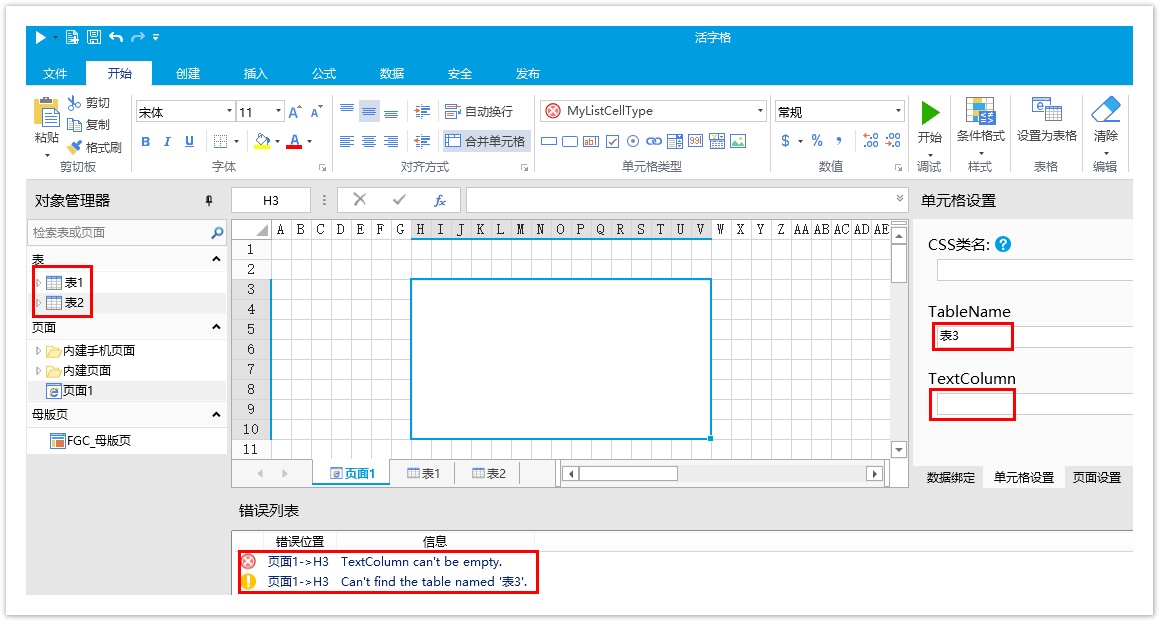
重新构建工程并重启设计器后,选择单元格区域并设置其类型为刚创建的“MyListCellType”。
数据表有表1和表2,在单元格设置中输入表名为“表3”并设置表的字段为空,运行时检查的错误如下: