1.描述
1.描述
如果单元格类型插件需要导出到Excel,这个单元格类型需要实现IExportCellType接口。
2.导出单元格为图片
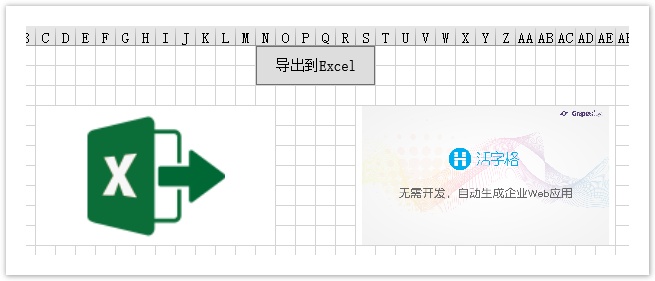
下面的示例中,当导出页面到Excel时,导出单元格为图片。
查看完整代码请参见:https://gitee.com/huozige-china/image-export。
操作步骤
 在.cs文件中,添加如下代码:
    namespace MyImageCellType
    {
        [Designer("MyImageCellType.MyImageCellTypeDesigner,MyImageCellType")]
        public class MyImageCellType : CellType
        {
            public ImageValue ImageInfo
            {
                get; set;
            }
        }
        internal class MyImageCellTypeDesigner : CellTypeDesigner<MyImageCellType>, IExportCellType
        {
            public bool ExportPicture => true;

            public ExportResultInfo ExportToExcel(ICellInfo targetCell, IExportContext context)
            {
                var result = new ExportResultInfo();
                if (this.CellType.ImageInfo != null)
                {
                    var folderName = context.DrawingHelper.ForguncyImageEditorFolderPath;
                    if (this.CellType.ImageInfo.BuiltIn)
                    {
                        folderName = context.DrawingHelper.ForguncyBuiltInImagesFolderPath;
                    }
                    var imagePath = context.ExportImageContext.GetServerPathFunc("~/" + folderName + "/" + this.CellType.ImageInfo.Name);
                    var imageSource = context.GetPictureByPicturePath(imagePath, context.PictureSize.Width, context.PictureSize.Height);
                    result.ExportPicture = imageSource;
                }
                return result;
            }

            public override FrameworkElement GetDrawingControl(ICellInfo cellInfo, IDrawingHelper drawingHelper)
            {
                Grid container = new Grid();
                if (this.CellType.ImageInfo != null)
                {
                    //uploaded image in ImageSelectorEditor
                    var imagePath = Path.Combine(drawingHelper.ForguncyImageEditorFolderPath, this.CellType.ImageInfo.Name);
                    if (this.CellType.ImageInfo.BuiltIn)
                    {
                        //builtin image in ImageSelectorEditor
                        imagePath = Path.Combine(drawingHelper.ForguncyBuiltInImagesFolderPath, this.CellType.ImageInfo.Name);
                    }
                    Image image = new Image();
                    try
                    {
                        image.Source = new BitmapImage(new Uri(imagePath, UriKind.RelativeOrAbsolute));
                    }
                    catch (Exception)
                    {
                        //不支持预览svg格式的图片
                    }
                    image.Stretch = System.Windows.Media.Stretch.Uniform;
                    image.VerticalAlignment = VerticalAlignment.Center;
                    image.HorizontalAlignment = HorizontalAlignment.Center;
                    container.Children.Add(image);
                }

                return container;
            }
        }
    }
在开头定义MyImageCellType ,可使用图片的路径获取图片资源。还可以使用字节数组获取图片。
 在.js文件中,添加如下代码:
var MyImageCellType = (function (_super) {
    __extends(MyImageCellType, _super);
    function MyImageCellType() {
        return _super !== null && _super.apply(this, arguments) || this;
    }

    MyImageCellType.prototype.createContent = function () {
        var self = this;

        var element = this.CellElement;
        var cellTypeMetaData = element.CellType;
        var container = $("<div id='" + this.ID + "'></div>");

        if (cellTypeMetaData.ImageInfo) {
            var imageDiv = $("<div></div>");
            if (cellTypeMetaData.ImageInfo.BuiltIn) {
                var imagePath = Forguncy.Helper.SpecialPath.getBuiltInImageFolderPath() + cellTypeMetaData.ImageInfo.Name;
            } else {
                imagePath = Forguncy.Helper.SpecialPath.getImageEditorUploadImageFolderPath() + cellTypeMetaData.ImageInfo.Name;
            }

            imageDiv.css("background-image", "url('" + imagePath + "')");
            imageDiv.css("background-position", "center");
            imageDiv.css("background-size", "contain");
            imageDiv.css("background-repeat", "no-repeat");
            imageDiv.css("width", "100%");
            imageDiv.css("height", element.Height);

            container.append(imageDiv);
        }


        return container;
    };

    MyImageCellType.prototype.getValueFromElement = function () {
        return null;
    };

    MyImageCellType.prototype.setValueToElement = function (element, value) {

    };

    MyImageCellType.prototype.disable = function () {
        _super.prototype.disable.call(this);
    };

    MyImageCellType.prototype.enable = function () {
        _super.prototype.enable.call(this);
    };

    return MyImageCellType;
}(Forguncy.CellTypeBase));

// Key format is "Namespace.ClassName, AssemblyName"
Forguncy.CellTypeHelper.registerCellType("MyImageCellType.MyImageCellType, MyImageCellType", MyImageCellType);

重新构建工程并重启设计器,选择单元格并设置其单元格类型为“MyImageCellType”类型,分别选择内置图片和本地图片,运行页面如下所示:

单击“导出Excel”后,在Excel中打开,如下图所示: