
 1.描述
1.描述
如果您想为单元格插件添加默认样式,当您将单元格变更成其他单元格类型时,样式同时被清除。
2.添加默认样式
例如,当您设置单元格类型为超链接时,输入文字后会变成蓝色并且有下划线,如果您将其类型更改为文本框时,样式将被清除,如何做到呢?
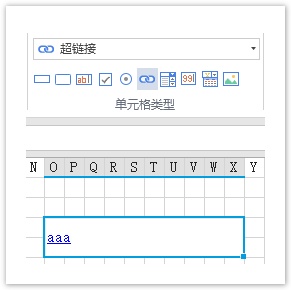
您需要实现ISupportStyleInitialize接口,并且返回默认样式,如下所示:
[Designer("MyHyperlinkCellType.MyHyperlinkCellTypeDesigner,MyHyperlinkCellType")]
public class MyHyperlinkCellType : CellType
{

}
public class MyHyperlinkCellTypeDesigner : CellTypeDesigner<MyHyperlinkCellType>, ISupportStyleInitialize
{
    public Dictionary<StylePropertyName, object> GetDefaultStyleInfos(ICellInfo cellInfo)
    {
        var infos = new Dictionary<StylePropertyName, object>();
        infos.Add(StylePropertyName.Foreground, "Red"));    //set red color text
        infos.Add(StylePropertyName.Underline, true);    //set underline
        infos.Add(StylePropertyName.HorizontalAlignment, ForguncyCellHorizontalAlignment.Right);    //set right alignment

        return infos;
    }
}
重新构建工程并重启设计器,设置单元格的类型,并且当您改变其类型时,样式会被清除。
