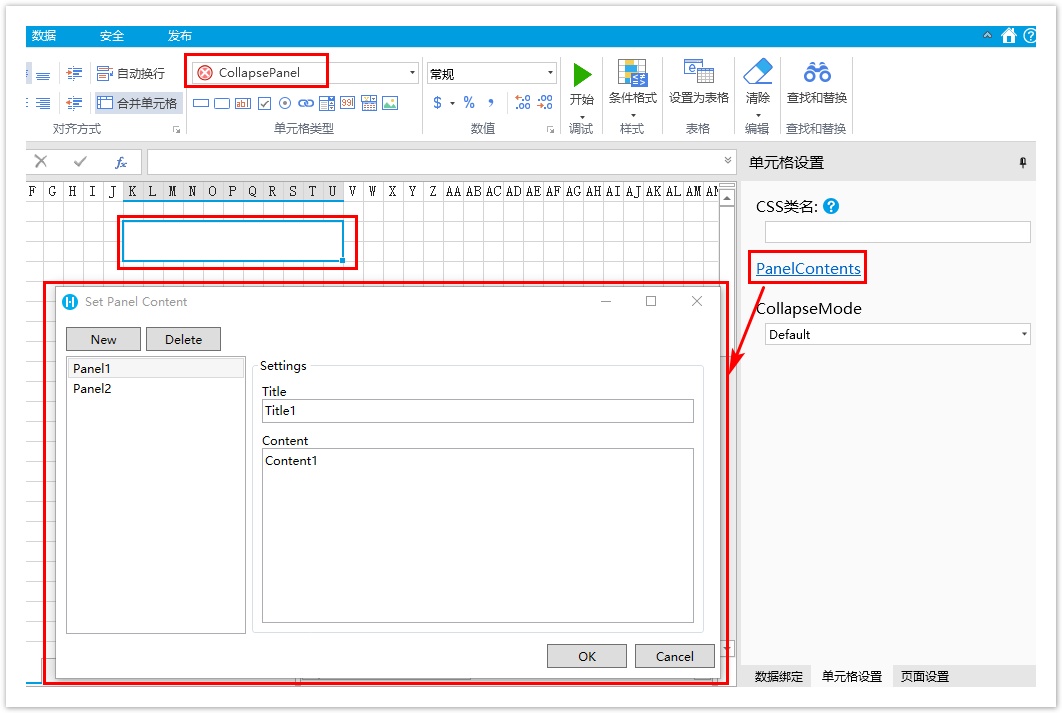
1.描述
1.描述
基于内置的超链接编辑器设置,您可以定制一个对话框来编辑复杂的属性。
查看完整代码请参见:https://gitee.com/huozige-china/edit-panel-content-command。
2.自定义属性编辑器
操作步骤
 先创建好一个对话框,如下所示:
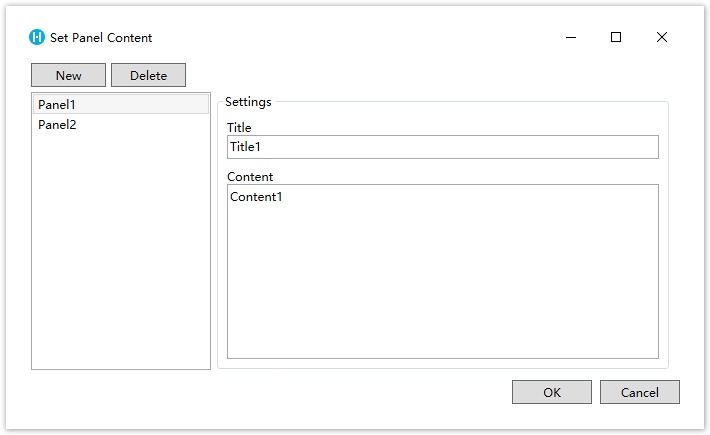
 创建一个命令来打开对话框。
public class EditPanelContentCommand : ICommand
    {
        private Window _window;

        private IEditorSettingsDataContext _dataContext;

        private PanelEditorControl _control;

#pragma warning disable CS0067
        public event EventHandler CanExecuteChanged;
#pragma warning restore CS0067
        public bool CanExecute(object parameter)
        {
            return true;
        }

        public void Execute(object parameter)
        {
            _dataContext = parameter as IEditorSettingsDataContext;

            //init the dialog data based on the property value.
            _control = new PanelEditorControl();
            _control.ViewModel.Model = _dataContext?.Value as List<PanelContentInfo>;
            var buttonControl = new StackPanel() { Orientation = Orientation.Horizontal, HorizontalAlignment = HorizontalAlignment.Right, Margin = new Thickness(0, 5, 5, 10) };
            var okButton = new Button() { Content = "OK", Width = 80 };
            okButton.Click += OkButton_Click;
            var cancelButton = new Button() { Content = "Cancel", Width = 80, Margin = new Thickness(8, 0, 0, 0) };
            cancelButton.Click += CancelButton_Click;
            buttonControl.Children.Add(okButton);
            buttonControl.Children.Add(cancelButton);

            var grid = new Grid();
            grid.RowDefinitions.Add(new RowDefinition() { Height = new GridLength(1, GridUnitType.Star) });
            grid.RowDefinitions.Add(new RowDefinition() { Height = new GridLength(1, GridUnitType.Auto) });
            grid.Children.Add(_control);
            grid.Children.Add(buttonControl);
            Grid.SetRow(_control, 0);
            Grid.SetRow(buttonControl, 1);

            _window = new Window();
            _window.WindowStartupLocation = WindowStartupLocation.CenterScreen;
            _window.Title = "Set Panel Content";
            _window.Width = 680d;
            _window.Height = 400d;
            _window.Content = grid;
            _window.ShowDialog();
        }

        private void CancelButton_Click(object sender, RoutedEventArgs e)
        {
            _window.Close();
        }

        private void OkButton_Click(object sender, RoutedEventArgs e)
        {
            _dataContext.Value = _control.ViewModel.Model;
            _window.Close();
        }
    }
其中活字格自定义的接口IEditorSettingsDataContext定义如下:
/// <summary>
/// Property context and can get the value and editor of property.
/// </summary>
public interface IEditorSettingsDataContext
{
    /// <summary>
    /// The property value.
    /// </summary>
    object Value { get; set; }

    /// <summary>
    /// The property editor.
    /// </summary>
    EditorSetting EditorSetting { get; set; }
}
 给CellType类型添加Designer并重写GetEditorSetting并指定编辑器为超链接编辑器。
[Designer("EditPanelContentCommand.CollapsePanelDesigner, EditPanelContentCommand")]
    public class CollapsePanel : CellType
    {
        public CollapsePanel()
        {
            PanelContents = new List<PanelContentInfo>();
            PanelContents.Add(new PanelContentInfo() { Title = "Title1", Content = "Content1", Name = "Panel1" });
            PanelContents.Add(new PanelContentInfo() { Title = "Title2", Content = "Content2", Name = "Panel2" });
        }
        public List<PanelContentInfo> PanelContents
        {
            get;
            set;
        }

        public CollapseMode CollapseMode
        {
            get; set;
        }

    }

    public class CollapseMode
    {
    }

    public class PanelContentInfo : PropertyChangedObjectBase
    {
        private string _title;
        public string Title
        {
            get => _title;
            set
            {
                if (_title != value)
                {
                    this._title = value;
                    this.OnPropertyChanged();
                }
            }
        }

        private string _content;

        public string Content
        {
            get => _content;
            set
            {
                if (_content != value)
                {
                    this._content = value;
                    this.OnPropertyChanged();
                }
            }
        }

        private string _name;

        public string Name
        {
            get => _name;
            set
            {
                if (_name != value)
                {
                    this._name = value;
                    this.OnPropertyChanged();
                }
            }

        }
        public override string ToString()
        {
            return Name;
        }

        public PanelContentInfo Clone()
        {
            return new PanelContentInfo
            {
                Title = this.Title,
                Name = this.Name,
                Content = this.Content
            };
        }
    }

    public class CollapsePanelDesigner : CellTypeDesigner<CollapsePanel>
    {
        public override EditorSetting GetEditorSetting(PropertyDescriptor property, IBuilderContext builderContext)
        {
            switch (property.Name)
            {
                case nameof(CollapsePanel.PanelContents):
                    return new HyperlinkEditorSetting(new EditPanelContentCommand());
                default:
                    return base.GetEditorSetting(property, builderContext);
            }
        }
    }

重新构建工程并重启设计器,效果如下。