1.描述
1.描述
如果您定义了一个属性,会根据您设置的属性类型默认为其生成合适的编辑器。
2.内置属性编辑器
内置属性编辑器如下表所示。
| 属性类型 | 编辑器 | 示例 |
|---|---|---|
String | 文本编辑器 | 文本输入框中的水印 |
Int | 整型编辑器 | 单选按钮单元格类型中的项目 |
bool | 复选框编辑器 | 只读 |
Double | 小数编辑器 | 百度地图单元格类型中的经度 |
Enum | 组合框 | 菜单单元格类型中的菜单颜色主题 |
TimeSpan | 时间编辑器 | 时间单元格类型中的开始时间 |
ImageValue | 选择图片编辑器 | 数据导航按钮中的选择图片 |
List<Command> | 命令编辑器 | 按钮中的编辑命令 |
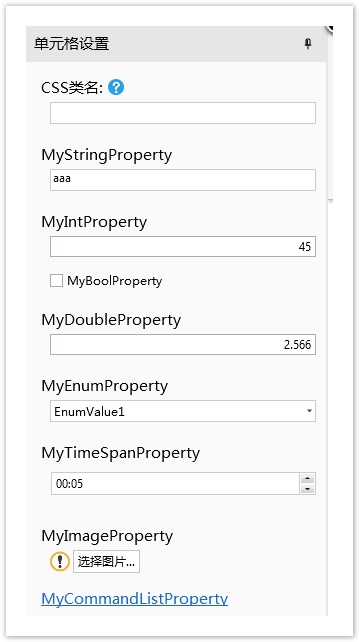
例如,如下的代码中,数据类型及对应的编辑器。
public class DemoCellType : CellType
{
    public string MyStringProperty
    {
        get; set;
    }
    public int MyIntProperty
    {
        get; set;
    }
    public bool MyBoolProperty
    {
        get; set;
    }
    public double MyDoubleProperty
    {
        get; set;
    }
    public MyEnum MyEnumProperty
    {
        get; set;
    }
    public TimeSpan MyTimeSpanProperty
    {
        get; set;
    }
    public ImageValue MyImageProperty
    {
        get; set;
    }
    public List<Command> MyCommandListProperty
    {
        get; set;
    }
}
public enum MyEnum
{
    EnumValue1,
    EnumValue2,
    EnumValue3
}
在设计器中显示如下:
3.其他编辑器
还有一些编辑器,您可以通过手工来指定。
| 编辑器 | 示例 |
|---|---|
| 链接编辑器 | 菜单单元格类型中的“编辑菜单项目”属性。 |
| 数据表选择器 | 数据导航按钮单元格类型中的“导航表”属性。 |
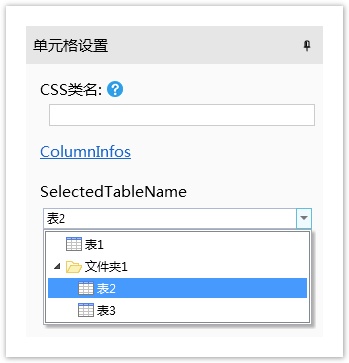
下面是的示例中,重写了GetEditorSetting方法,指定编辑器为链接编辑器和数据表选择器:
[Designer("DemoCellType.DemoCellTypeDesigner, DemoCellType")]//格式为 "Namespace.ClassName, AssemblyName"
public class DemoCellType : CellType
{
    public List<ColumnInfo> ColumnInfos
    {
        get; set;
    }
    public string SelectedTableName
    {
        get; set;
    }
}
public class DemoCellTypeDesigner : CellTypeDesigner<DemoCellType>
{
    public override EditorSetting GetEditorSetting(PropertyDescriptor property, IBuilderContext builderContext)
    {
        if (property.Name == "SelectedTableName")
        {
            return new TableComboTreeSelectorEditorSetting();
        }
        if (property.Name == "ColumnInfos")
        {
            //here you can open the dialog you write...
            return new HyperlinkEditorSetting(new EditColumnCommand());
        }
        return base.GetEditorSetting(property, builderContext);
    }
}
public class ColumnInfo
{
    public string ColumnName
    {
        get; set;
    }
    public ForguncyTableColumnType ColumnType
    {
        get; set;
    }
}
public class EditColumnCommand : ICommand
{
    public event EventHandler CanExecuteChanged;
    public bool CanExecute(object parameter)
    {
        return true;
    }
    public void Execute(object parameter)
    {
        //open your dialog...
    }
}
效果如下: